
Roles
UX + Accessibility Audit
Design System Documentation
Team
1 Programming Manager
1 Engineering Manager
~8-10 Developers
Timeline
1 Month
Overview
Stark Tech is a construction engineering company specializing in building automation systems (BAS) — commercial HVAC systems controlled by an IoT desktop user interface — for B2B clients. There, I self-initiated a design system refresh and SharePoint documentation formalizing the programming team’s workflow for designing & developing BAS interfaces.
Results
The new design standards & documentation were officially adopted by my team in July 2025, causing a butterfly effect within Stark’s Florida teams:
Within weeks: ~10-15 ongoing BAS projects adopted new design standards, with faster project turnaround times + less live system errors on-site
For the long run: 4 company-wide initiatives launched by supervisors to standardize cross-team communication and training
Context
A company quickly outgrowing its older processes

Stark Tech’s programming team nearly doubled in size over the past few years, quickly outgrowing its older practices more suitable for smaller companies.

Stark’s teams rarely communicated, providing little to no training & standardized processes. This resulted in inconsistent project quality & delayed deadlines.

Programming & display errors in BAS interfaces can especially cause critical equipment failures — making building conditions unsafe for occupants.
Define
How might we improve cross-team communication, ensure consistent project quality, and reduce BAS interface errors without putting more burden on a growing dev team?
Process
Being the sole designer on an all-dev team, I was navigating ambiguity with little oversight. Much of the design system refresh was done over time, recording processes and component specs as I went in my personal notes before formally defining them in the documentation alongside my team’s operating processes.
UX Audit of Existing Components
I audited Stark’s existing UI component library to resolve the inconsistencies devs created over time. Because many of the inconsistencies violated accessible web design principles, I audited the components against WCAG 2.1. Below are some of the key accessibility issues I identified:

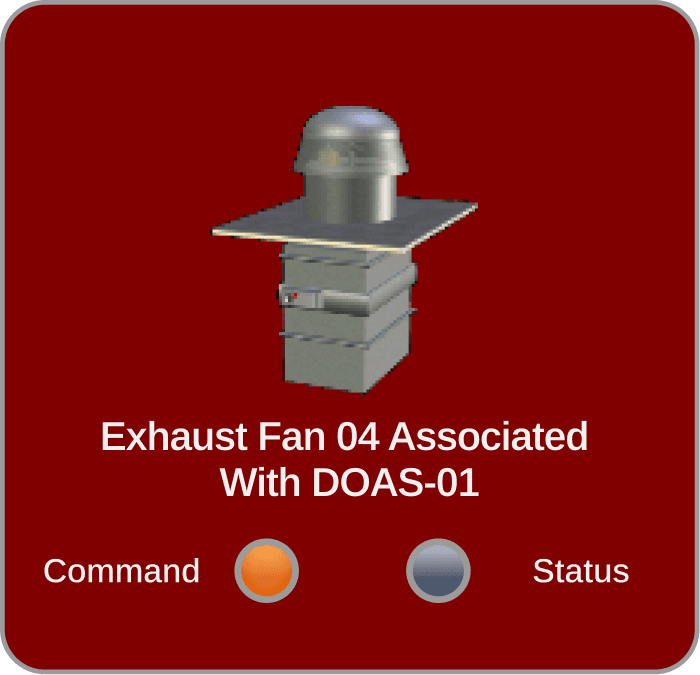
Poor Legibility: Poor color contrast ratios on cards like this one make the fan status indicators hard to read, with no context for alarm statuses (which turns the card red).

No Clear Context/Sectioning: Screens displaying key information of different types of A/C units are packed into dense tables, causing cognitive overload.

Why does accessibility still matter here?
Even though Stark’s BAS interfaces are primarily designed for a highly specialized trade, there are still business cases that benefit field technicians:

Situational Use Cases: Looking at screens in the sun, apprentices unfamiliar with BAS interfaces

Temporary Disabilities: Getting injured on the job (e.g. broken arm, cuts + scrapes)

Aging Technicians: May have low vision, limited mobility, etc. that could affect their performance
Exploring Accessibility Improvements
Every design decision in the refresh was shaped by what Stark’s hybrid design-dev environment for BAS interfaces was capable of, what would benefit field technicians in demanding conditions, and what devs on my team could replicate without a designer. The tool particularly had limited UI design/dev capabilities: basic interaction design & motion, no scrollable screens, and an older version of JavaScript. I had to use creative loopholes to work around these constraints.
01
Poor legibility


02
No clear context/sectioning
A: Visual dividers
The easiest to implement, low cognitive load, and does not take up a lot of space on the screen.

Why I rejected this: Dividers are purely cosmetic. It holds no meaning and no benefit to technicians scanning screens quickly.
B: Explicit section headings
Adds semantic structure aligned with WCAG 2.4.6 while providing context to the dense data tables (e.g. specs of each type of A/C unit).
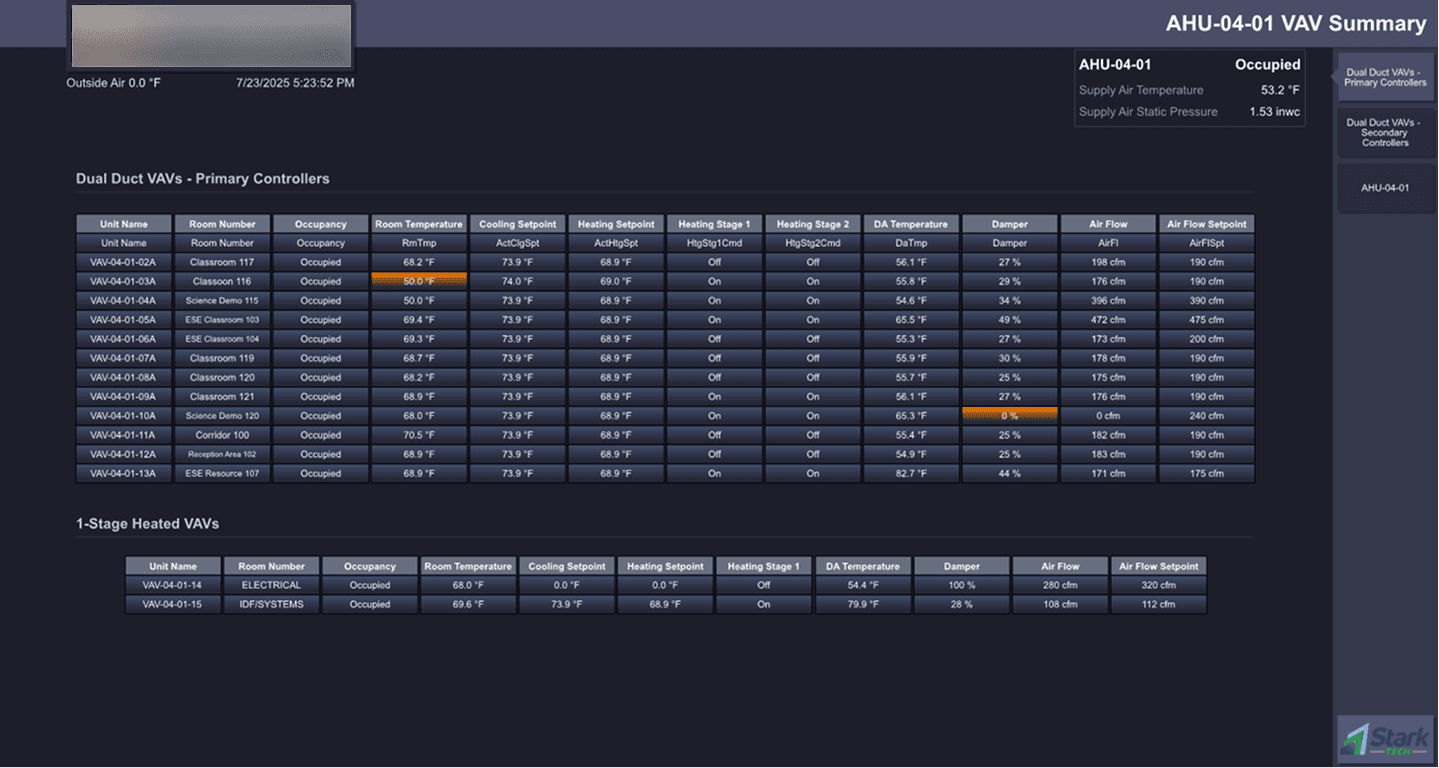
Why I chose this (with a tradeoff): Improves legibility for technicians scanning dense data screens while defining hierarchy. However, it takes up more screen real estate (BAS screens are not scrollable in the tool).
03
Inconsistent navigation
The core decision here was which naming convention became the standard:
A: Use side navbar labels.

Why I chose this: Navbar labels are read first before opening anything.
B. Use side menu labels

Why I rejected this: Side menus are hidden unless opened; users be reading its label second (despite being to the left of the navbar labels).
Users — in this case Stark’s field technicians — read the navbar labels first when using the sidebar menus on BAS interfaces. Because technicians navigate across multiple client buildings and system configurations under pressure, inconsistent naming could create confusion and increase the chance of errors.
From Personal Notes to Documentation
When I first joined the team, I was constantly taking notes on project workflows, learning the design-dev environment Stark used, and where my role fits within the team. These notes helped me learn and adapt to my role very quickly, soon sparking an idea in my head:
Opportunity
“What if I share these notes with the rest of the my team?”

Some of the (many) notes I had while I was at Stark Tech
They had the potential to be a good resource for developers who needed to jump in on design work during Stark’s busy season. Over time, my notes evolved into a formal documentation draft with refreshed component specs, a UI style guide, standard team processes, and more.
However, there was a catch…
Standard design system documentation platforms & tools were not available at Stark. I explored whether to push for adopting a dedicated design tool, but this was a significant detour for an engineering team that was already stretched thin across multiple projects.
With this in mind, I chose to build a SharePoint site for the documentation to live in. SharePoint was already adopted company-wide, so it was more likely for my team to actually use it.
Solution
01
Design system refresh
The refreshed design system expanded UI/UX consistency to ~25+ components and introduced 7 new UI templates for key BAS interface screens, including resolving 7 key accessibility issues.
The goal here was to fix the components in ways the programming team can maintain & replicate them without ongoing designer support.


02
Design documentation built for engineers
Being the sole designer at a company that is predominantly engineers & trade workers, I intentionally written the documentation to be direct & easy to follow. This would especially benefit in situations where devs needed to jump in to assist on BAS interface projects during Stark's busy periods.
The documentation included:
A defined UI style guide covering foundations like fonts, colors, and spacing
Step-by-step standard operating processes for building BAS interfaces
Web accessibility basics + resources (e.g. the WebAIM contrast checker)
Design best practices & component specs
Results
Within weeks: ~10-15 active projects covered
The refreshed design system & documentation were officially adopted by Stark’s programming team in July 2025. Within weeks, ~10-15 active BAS interface projects adopted the new standards.
Since then, this caused a butterfly effect in some form: devs reported faster turnaround times without sacrificing project quality. More UI consistency meant fewer errors caught by technicians and allowed them to complete jobs faster on the field.
In the long run: 4 company-wide initiatives launched
After proposing the documentation to my supervisors, the impact on our team was big enough for them to roll out 4 company-wide initiatives to improve cross-team communication & training:
Creating a new corporate trainer role
Implementing SOPs across our entire department (engineering)
Adopting Jira for project management
Hiring a project coordinator to improve cross-team communications
Learnings
Navigating ambiguity + discovering opportunities
This project is one of the biggest turning points in my career so far, being the first time I’ve navigated ambiguity and took on full ownership of a project 0→1. What started out with me taking (a lot of) notes to learn Stark’s specialized dev environment for building BAS UI turned into an initiative with noticeable business impact. Nobody asked me to do this — I just wanted to make my team’s jobs a little easier.
Design is everywhere, even in places least expected
My role at Stark required me to adapt my designer skillset toward a tool stack for devs & mechanical engineers (Schneider Electric, SketchUp, VS Code). I brushed up on JavaScript and learned how to read complex engineering drawings, occasionally leaning more into design engineering than pure UX/UI. Despite not working in Figma, I worked around these constraints with the devs to craft meaningful design solutions.
Want to learn more?
I'd love to talk more about my design process over a call!